Saturday, January 29, 2011

MySQL - Tools


Here I have laid out several programs, monitors and software clients. How to enable the protocol requests and how to configure the correct encoding told on other pages.

MySQL-monitoring

Script mybeep similar to the known mytop. It keeps track of requests processed by a demon and gives information about them. The distinctive features of my script as follows:
  • The format in which information is presented much more primitive. So, my script does not require any modules of the terminal.
  • When the number of executed tasks is reduced, the script generates a short beep.
I use this script when you have to actively work with large amounts of data. For example, to consolidate multiple databases of different formats volume in millions of records. In such cases, a request may take a few minutes and have a similar opoveschalku that the request is processed, it is very helpful.
The script is written in Perl. All the settings inside. Uses FreeBSD-device / dev / speaker. Ensure that the program has the right to write everything (right configured in / etc / devfs.conf).
See also how to configure the logging of SQL-queries .

MySQL-info

Two shell-script. One shows all the information on all tables accessible databases. The second is similar, but shows the query results show create table.
The necessary connection parameters can easily be put directly into the TV scripts. Now it is a root without a password.

CGI-terminal

In the section for the CGI-developers , you can download CGI-terminal to work with MySQL.

Adding Users

From considerations of basic protection from himself, for every project I create a new database, and for each database - a single user with rights only to the base.

- Creating a database CREATE DATABASE joomla; - create a user (no rights) GRANT USAGE ON *.* TO 'joomla' @ 'localhost'; - give the new user rights only to a new base GRANT SELECT, INSERT, UPDATE, DELETE, CREATE, DROP ON `joomla` .* TO 'joomla' @ 'localhost'; - set a user password SET PASSWORD FOR joomla @ localhost = PASSWORD ('wiki'); 

If you need a password, it should be put, now it is not.

Setting Encoding

Tips and comments on the encoding in MySQL , I issued a separate page.

MySQL-Documentation

In those days, when the documentation for MySQL can be downloaded only one large HTML-file, I wrote a Perl-script , to split the file. In this case, all cross-references, including the index remain operational.
Now the script is largely lost its relevance, as developers now provide documentation in many formats, including a set of HTML-files. Nevertheless, with the help of my script, you can split the documentation for more convenient for you to pieces.

Thursday, January 27, 2011

Using UNION to implement loose index scan in MySQL: Followup on UNION for query optimization, Query profiling


One little known fact about MySQL Indexing, however very important for successfull MySQL Performance Optimization is understanding when exactly MySQL is going to use index and how it is going to do them.
So if you have table people with KEY(age,zip) and you will run query something like
SELECT name FROM people WHERE age BETWEEN 18 AND 20 AND zip IN (12345,12346, 12347) do you think it will use index effectively ? In theory it could – it could look at each of the ages from the range and look at all zip codes supplied. In practice – it will not:
mysql> explain SELECT  name FROM people WHERE age BETWEEN 18 AND 20 AND zip IN (12345,12346, 12347);
+----+-------------+--------+-------+---------------+------+---------+------+-------+-------------+
| id | select_type | table  | type  | possible_keys | key  | key_len | ref  | rows  | Extra       |
+----+-------------+--------+-------+---------------+------+---------+------+-------+-------------+
|  1 | SIMPLE      | people | range | age           | age  | 4       | NULL | 90556 | Using where |
+----+-------------+--------+-------+---------------+------+---------+------+-------+-------------+
1 row in set (0.01 sec)
As you see instead only first index keypart is used (key_len is 4) and zip part where clause is applied after rows are retrived. Notice Using Where. There are even more bad news. Full rows will need to be read to check if zip is in the list, while it could be done only by reading data from the index. MySQL can ether read index only for all rows, in this case you will see “Using Index” in EXPLAIN output or it will read row data for all rows – it can’t read Index and perform row read only if it needs to be done at this point.

Monday, January 24, 2011

How to profile a query in MySQL


When people discuss query optimization on MySQL, or say a query doesn’t perform well, they usually mention execution time. Execution time is important, but it’s not the only metric to use (or even the best). There are many other ways to measure the work a query requires. This article explains how to really profile a query — what to measure, how to do it as accurately as possible, and what it means.
This is the first article in a series. In upcoming articles I’ll demonstrate some hands-on profiling with concrete examples, and give you a tool to automate the job.

Why profile queries?

Why should you profile your queries? After all, if it only takes a hundredth of a second, isn’t that good enough? Even if you could make it twice as fast, do you care about such a small amount of time?
Absolutely, unless you only run that query once in a while. Your queries will probably follow the 90/10 rule. 90% of your work will be caused by 10% of the queries. You need to optimize whatever causes most of the work, and in my experience, it’s often sub-millisecond queries being run thousands or millions of times. Optimize queries that are expensive because they run all the time, and those that are expensive because they cause a lot of work. You can’t just do one and really reduce the overall load on your server.
Here’s an example from my work: We currently have many archiving and purging jobs running nightly, pruning tables with thousands or millions of tiny queries. I recently profiled one job’s query and found it was using indexes badly. I rewrote the query, and instead of taking dozens of seconds per thousand rows, it now takes one or two, plus it causes a lot less disk activity. Each individual query, according to the mysql command-line client, takes 0.00 seconds before and after optimization — so if I didn’t profile that query, I wouldn’t have an effective way to optimize it, except watching it run for a while (which, by the way, does not count as profiling).
You need to profile your queries so you know how they really perform....

Sunday, January 23, 2011


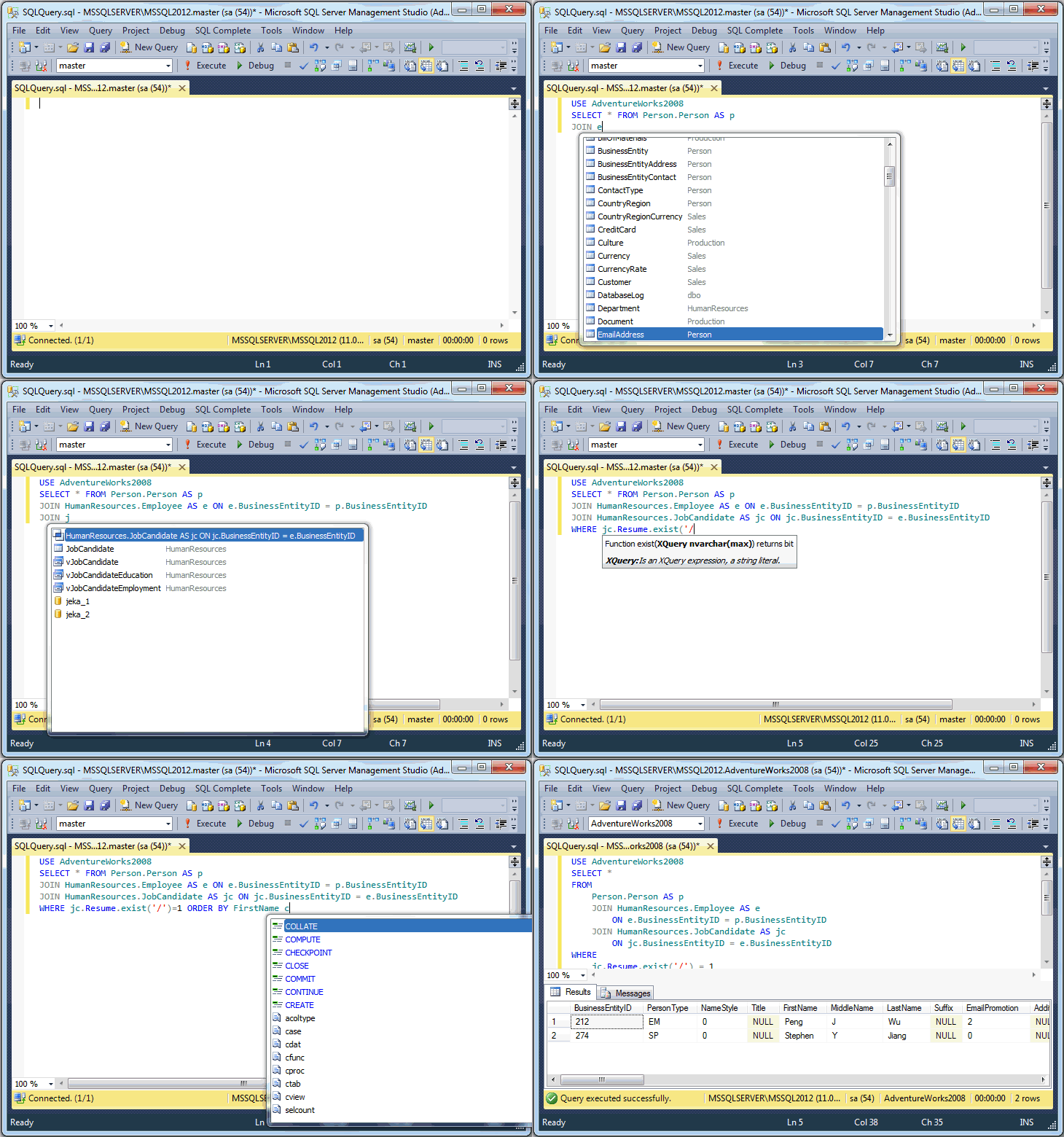
FREE Advanced Intellisense in SQL Server Management Studio

SQL Complete: smart autocomplete for SQL Server developers & DBAs

dbForge SQL Complete is a useful add-in for SQL Server Management Studio 2005 and 2008 that offers powerful autocompletion and formatting of T-SQL code.
Besides extending List Members, Complete Word and Parameter Info features, SQL Complete adds SQL Formatter to enrich the developer toolkit and provide the fastest T-SQL query typing ever possible.