Friday, December 31, 2010

Funny MySQL

MySQL Humor

A webcomic of romance, sarcasm, math, and language


Thursday, December 30, 2010

Funny MySQL option command line

MySQL has atleast one funny named command line option that made me chuckle. The option is named “–i-am-a-dummy”. From the MySQL manual:
Allow only those UPDATE and DELETE statements that specify which rows to modify by using key values. If you have set this option in an option file, you can override it by using –safe-updates on the command line.
This option is an alias of “–safe-upfates”. I wonder for a while what is the story behind having two alternate names for the same thing. Maybe it’s just the MySQL folks having some fun.

Tuesday, December 21, 2010

Debugger for MySQL


The final decision for professional debug stored procedures MySQL

mysql debugger
Debugger for MySQL offers a balanced set of advanced debugging features to help you minimize the time required for control and testing even the most complex stored functions and procedures. Its unique capabilities combined with an affordable price and a steep learning curve make it an excellent choice for novices and professionals alike.

If you are looking for a "one-stop" solution that will efficiently satisfy all of your code debugging needs and provide a comfortable developmentenvironment, look no further than Debugger forMySQL - your step-by-step guide to flawless code!
Debugger for MySQL provides you with a set of professional tools integrated into a comfortable, ergonomic and customizable environment, which will greatly facilitate and speed up your day to day testing and debugging procedures.
Using breakpoints, watch, call stack, expression evaluator, and other handy features to make sure that stored functions and procedures, as they should!
download debugger

Saturday, December 18, 2010

Top 10 MySQL GUI Tools

Most relational databases are designed to follow the two-tier programming model, having distinct components:
  1. The back-end -- where the data is warehoused
  2. The front-end -- a user interface for communicating with the data component
This type of design, which separates the data layer from the user interface, allows third parties to create rich applications to interact with various databases. In his DatabaseJournal.com article, Rob Gravelle lists ten outstanding graphical interfaces for MySQL.

This wealth of GUI tools help make MySQL a great database for web-facing applications, but its native tools tend to be a bit lacking -- requiring some shortcuts and hacks to get the most from the database. Enter Maatkit for MySQL, a great toolkit with a bewildering array of command-line tools that fill the gap where MySQL's native tools leave off.

Sean Hull's DatabaseJournal.com article explains how from data replication to query profiling and optimizing Maatkit has tools to make you smarter and to help you get your MySQL tasks done.

Many third parties create rich applications to facilitate database management, database development and database administration. Here are ten outstanding graphical interfaces for MySQL.
Most relational databases, with the notable exception of MS Access, are comprised of two distinct components: the back-end, where the data is warehoused, and the front-end, a user interface for communicating with the data component. This type of design is quite clever, as it parallels the two-tier programming model that separates the data layer from the user interface and allows the makers of the database software focus on their product’s strongest suit: data storage and management. It also opens the door for third parties to create rich applications to interact with various databases. Such products include Embarcadero Rapid SQL and Oracle SQL Developer. Here are ten outstanding graphical interfaces for MySQL.

1. Workbench

Manufacturer: Sun Systems/Oracle Website: http://dev.mysql.com/downloads/workbench/
Price: FREE
License: GPL License
Supported platforms: Microsoft Windows, Mac OS X and Linux

MySQL Workbench
MySQL Workbench is a visual database design tool that integrates SQL development, administration, database design, creation and maintenance into a single development environment. It is the successor to DBDesigner 4 from fabFORCE.net and replaces the MySQL GUI Tools Bundle. The current version is 5.2, the earliest version being 5.0, which emphasized the fact that MySQL Workbench was developed as the successor to DBDesigner4.

Monday, December 13, 2010

MySQL Backup

MySQL Backup - a Perl script (the script) that uses mysqlshow to "capture" of database names, types and names of the tables available to the user, and then runs the mysqldump to save data in the folder specified in the script. The script then archives the files (using tar and gzip), specifying the date and time as the file name.

The script can be run daily on a schedule using cron. It removes old files and can send gzip files via e-mail to the administrator and / or via FTP to a remote server. The script has the ability to "select data to display or selection of data for users who can not use mysqldump.

It can work with a long list of databases and tables.

Saturday, December 11, 2010

HowTo: Backup MySQL Databases

This is a simple backup solution for people who run their own web server and MySQL database server on a dedicated or VPS server. Most dedicated hosting provider provides backup service using NAS or FTP servers. These service providers will hook you to their redundant centralized storage array over private VLAN. Since, I manage couple of boxes, here is my own automated solution. If you just want a shell script, go here (you just need to provided appropriate input and it will generate FTP backup script for you on fly, you can also grab my php script generator code).

Making Incremental Backups With tar

You can make tape backups. However, sometime tape is not an option. GNU tar allows you to make incremental backups with -g option. In this example, tar command will make incremental backup of /var/www/html, /home, and /etc directories, run:
# tar -g /var/log/tar-incremental.log -zcvf /backup/today.tar.gz /var/www/html /home /etc
Where,
  • -g: Create/list/extract new GNU-format incremental backup and store information to /var/log/tar-incremental.log file.

Wednesday, December 8, 2010

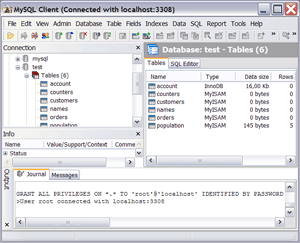
Client for MySQL - GUI to administer and query MySQL databases

This all-in-one tool will help you create, manage and edit MySQL databases. One intuitive interface for all tasks. Supports all releases of MySQL from 4.02 to 5.12 and all of the latest MySQL features including views, triggers, stored procedures and functions as well as InnoDB foreign keys.

Defining and managing the database-structure, importing data, editing data is now simple with this nice and convenient program. For designers with only a basic grasp of databases, this program is the way to go to make you independent of SQL gurus.
The program makes working with MySQL easy without hiding the language from the user. An editor is built-in, so even working with SQL-commands or scripts has been made convenient.

Monday, December 6, 2010

SQLWave. GUI Client for MySQL Database Server


Nerocode SQLWave is a powerful MySQL GUI Client tool designed to automate and simplify database development process. It also provides an easier way to explore and maintain existing databases, design compound SQL statements, query and manipulate data in different ways.
  • Fully MySQL 4.x - 5.x compliant.
  • Manage Stored Procedures, Functions, Triggers, Views, Events etc
  • Intuitive GUI interface for all MySQL operations
  • Very fast retrieval of data
  • Manage foreign key relationships
  • Fully InnoDB compliant
  • Connection and MySQL service manager
  • Syntax-highlighting and Intellisense
  • View advanced table properties, such as Type, Charset, Comment, Key_Length...
  • Monitor and manage variables, status, threads...
  • View your results in GRID / TEXT mode