Friday, December 31, 2010
Thursday, December 30, 2010
Funny MySQL option command line
Allow only those UPDATE and DELETE statements that specify which rows to modify by using key values. If you have set this option in an option file, you can override it by using –safe-updates on the command line.
Tuesday, December 21, 2010
Debugger for MySQL
The final decision for professional debug stored procedures MySQL
Debugger for MySQL offers a balanced set of advanced debugging features to help you minimize the time required for control and testing even the most complex stored functions and procedures. Its unique capabilities combined with an affordable price and a steep learning curve make it an excellent choice for novices and professionals alike. If you are looking for a "one-stop" solution that will efficiently satisfy all of your code debugging needs and provide a comfortable developmentenvironment, look no further than Debugger forMySQL - your step-by-step guide to flawless code! Debugger for MySQL provides you with a set of professional tools integrated into a comfortable, ergonomic and customizable environment, which will greatly facilitate and speed up your day to day testing and debugging procedures. Using breakpoints, watch, call stack, expression evaluator, and other handy features to make sure that stored functions and procedures, as they should! |
Saturday, December 18, 2010
Top 10 MySQL GUI Tools
- The back-end -- where the data is warehoused
- The front-end -- a user interface for communicating with the data component
1. Workbench
Manufacturer: Sun Systems/Oracle Website: http://dev.mysql.com/downloads/workbench/Price: FREE
License: GPL License
Supported platforms: Microsoft Windows, Mac OS X and Linux
MySQL Workbench is a visual database design tool that integrates SQL development, administration, database design, creation and maintenance into a single development environment. It is the successor to DBDesigner 4 from fabFORCE.net and replaces the MySQL GUI Tools Bundle. The current version is 5.2, the earliest version being 5.0, which emphasized the fact that MySQL Workbench was developed as the successor to DBDesigner4.
Monday, December 13, 2010
MySQL Backup
The script can be run daily on a schedule using cron. It removes old files and can send gzip files via e-mail to the administrator and / or via FTP to a remote server. The script has the ability to "select data to display or selection of data for users who can not use mysqldump.
It can work with a long list of databases and tables.
Saturday, December 11, 2010
HowTo: Backup MySQL Databases
Making Incremental Backups With tar
# tar -g /var/log/tar-incremental.log -zcvf /backup/today.tar.gz /var/www/html /home /etc- -g: Create/list/extract new GNU-format incremental backup and store information to /var/log/tar-incremental.log file.
Wednesday, December 8, 2010
Client for MySQL - GUI to administer and query MySQL databases
Defining and managing the database-structure, importing data, editing data is now simple with this nice and convenient program. For designers with only a basic grasp of databases, this program is the way to go to make you independent of SQL gurus.
The program makes working with MySQL easy without hiding the language from the user. An editor is built-in, so even working with SQL-commands or scripts has been made convenient.
Monday, December 6, 2010
SQLWave. GUI Client for MySQL Database Server
- Fully MySQL 4.x - 5.x compliant.
- Manage Stored Procedures, Functions, Triggers, Views, Events etc
- Intuitive GUI interface for all MySQL operations
- Very fast retrieval of data
- Manage foreign key relationships
- Fully InnoDB compliant
- Connection and MySQL service manager
- Syntax-highlighting and Intellisense
- View advanced table properties, such as Type, Charset, Comment, Key_Length...
- Monitor and manage variables, status, threads...
- View your results in GRID / TEXT mode
Thursday, October 14, 2010
TOP 5 MySQL GUI tools
1. EMS SQL Manager for MySQL З
2. SQL Maestro for MySQL
SQL Maestro for MySQL is the premier MySQL admin tool for MySQL database management, control and development. Key features include: · Support for all the MySQL server versions from 3.23 · Easy database object management · Database Designer · Data management: editing, grouping, sorting and filtering abilities · Handy SQL Editor with code folding and multi-threading · Visual Query Builder with support for subqueries and UNIONS · Working with remote MySQL servers via SSH or HTTP tunnel · Data export/import to/from the most popular formats · Powerful BLOB Viewer/Editor The application also provides you with a powerful set of tools to edit and execute SQL scripts, build visual diagrams for numeric data, compose OLAP cubes, and much more. Easy installation and intuitive interface in combination with support of all the MySQL latest features make it an irreplaceable tool for MySQL on the web or at your local desktop. |
3. SQLYog MySQL GUI
4. DreamCoder for MySQL Enterprise
5. dbForge studio for MySQL
Wednesday, October 6, 2010
How to Buy MySQL Products and Services
Buy from the Oracle Store
Sunday, August 29, 2010
Backup - a delicate.

Backup - a delicate matter.
Saturday, August 28, 2010
Daily backup of web projects
Bat-script for daily backup mysql
It is proposed to your attention the bat-script for daily backup home-directory of your site and database (MySQL).
Requirements: Windows (in my work - 2000), the mysqldump available directly from the command line, WinRAR or any other archiver that runs from the command line.
@echo off
set DATE = `date \T`
@md "%DATE%"
cd "%DATE%"
mysqldump drupal -u root > "drupal-%DATE%.sql"
"C:\Program Files\WinRAR\rar.exe" a -inul "htdocs-%DATE%.rar" c:\apache\htdocs
cd "../"
The script can be run manually or on a schedule planner (fairly standard system scheduler). For Linux you can easily rewrite this script for your system.
When you run is generated directory-type "Mon 08/21/2010, and in it two files -" drupal-Mon 08/21/2010.sql "and" htdocs-Mon 08/21/2010.rar ". New day - new directory. The advantage of a separate directory that you can create multiple backups of different sites.
And finally - if someone knows how to change the date format on 2010/21/08 - please write.
Friday, August 27, 2010
Mysqldump in csv format
Pull data from mysql table in a simple CSV
So, give in to the power of the console and write:
mysqldump -u [USER_NAME] -p "--where=[WHERE]" "--fields-terminated-by=," "--tab=./" [DB_NAME] [TABLE] > [TABLE].txt
So much love (at the output we get two files - one with SQL and the second with CSV)
p.s. directory that runs this command must be open for entries, otherwise it will curse;)
Monday, August 9, 2010
How To: Setup Daily MySQL Backup on Win
How To: Setup Daily MySQL Backup on Windows
Making database backups is one of the most important things in the process of administrating MySQL databases, because some critical data loss can be irreplaceable.
The task of making daily mysql backup can be solved with the help of the backup database function of dbForge Studio for MySQL. To use it, you should setup backup in the wizard manually and schedule making backups.
Saturday, July 3, 2010
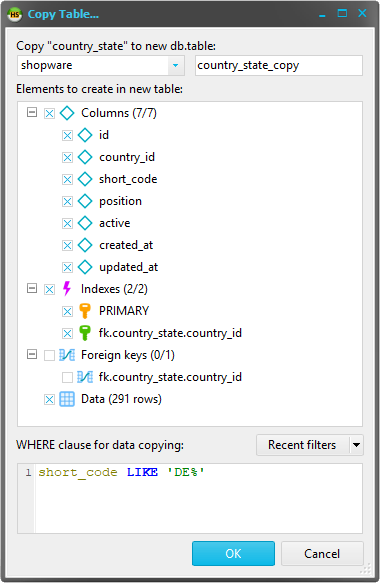
Usability HeidySQL. Revamp "Copy table" dialog.
New features:
- Select specific indexes or foreign keys to be created in the new table
- An editor for a WHERE clause, for cases in which you only need a subset of the original row data in the target table
- A menu for recently used WHERE clauses, so you don't need to keep them all in mind
- Prompts for overwriting if the new table exists
http://www.heidisql.com/forum.php?t=5966
Sunday, June 20, 2010
Best backup tool for mySQL
Backing Up and Restoring A MySQL Database
Buy best backup tool for mysql.Do you need to change your web host or switch your database server? This is probably the only time when you really think of backing up your MySQL data.
If you've got a website with a database or your custom database running for your applications, it is imperative that you make regular backups of the database.
Wednesday, June 2, 2010
NEW !!! dbForge Studio for MySQL 4.50
New dbForge Studio for MySQL 4.50 GOOD MySQL GUI
Redesigned Database Backup WizardSchema Export wizard has been totally redesigned to provide more freedom for backing up schemas. It features the following:- Capability to save backup options for future use
- Support of command line interface. You can back up schemas in automatic mode using Windows task scheduler
- Automatic archiving of schema backup scripts
- Writing a report about backup process into a log file
- Automatic removing old backup files based on date or quantity
New tool for database developers - Query ProfilerdbForge Studio offers results of internal MySQL tools like SHOW PROFILE and EXPLAIN in a convenient and clear GUI. Besides you get STATUS variables for the required query automatically calculated.Additional benefits:- Plan of the query displayed in the tree view for easy review
- Profiling history that can be saved for further analysis
- Capability to compare profiling results in two clicks
- Capability to print profiling results
Wednesday, April 28, 2010
Profiler for MySQL. MySQL perfomance Online.
Profiler for MySQL tool
It's core features:
- Query, table and user performance
- Graphical visualisation
- Low overhead
- User friendly
Query, table and user performance
Graphical visualisation
Low overhead
Most of the profiling work is done in the Jet Profiler application, not in the database server. Therefore, the performance hit is normally negligible, around 1%.
User friendly
It supports all MySQL versions. No database server changes are necessary. No agents or separate services are needed. Jet Profiler is a desktop application which runs on your computer. You start it, connect to a server, hit the record button and you can review the results in minutes. Jet Profiler runs on Windows, Mac and Linux.
Jet Profiler is a great tool to pinpoint performance problems in MySQL databases. It shows the heaviest queries and helps you optimize performance.
Screenshots
Top Queries
The screenshot shows a sequence of 8 minutes of test load, with peaks every 90 seconds. The upper line chart diagram shows Threads, number of total connected threads in light blue and number of running threads (executing queries) in dark blue. The red area indicates how many slow queries are running. The Top Queries table shows which queries are most frequently observed along with a rating based on EXPLAIN. This view is the most important tool to find the worst performing queries.
Top Users

Top Tables
Query ratings
Friday, April 16, 2010
Navicat™ Version 9 is released!!!
Navicat corp. announce the immediate release of version 9 for the Navicat™ for MySQL.
New Key features:
- Enhanced Code Completion - much better than it was!
- Code Formatter NEW
- Code outline
- Recovery of Documents from crashes
- Shortcut to open official online documents
- Option to show query results below query editor
- Storing favorite actions as shortcut
- Enhanced User Interface - Interface pleased
Code/Word Completion
A more intuitive way to write your SQL statement? Here it comes with Navicat 9! Having assistance with code typing, automatic word completion and database object and attributes browsing. It now provides integrated and fully interactive SQL code assistance system for instant help on writing SQL statement.
Thursday, April 8, 2010
Overview of tools for working with MySQL. Overview MySQL GUI.
The review below shows some of the most useful and popular development tools for Mac, Windows and Linux, for beginners and professionals. Among these tools is particularly highlight SQLyog, dbForge, PhpMyAdmin, MySQL Workbench, HeidiSQL and SequelPro.
MySQL Workbench (Win, Linux, Mac)
This application is a full-featured tool for working with data, it includes database design, modeling, creation and maintenance grouped into a single development environment data for MySQL. Free Download - Community Edition, which contains features that will satisfy virtually all your needs. If you will not miss any features, you can always go to the commercial version (Standard Edition).Friday, March 26, 2010
Learn MySQL With Sakila sample Mysql Database
Obtain the example Sakila database from the MySQL website to examine a professionally designed database and use a SQLyog GUI for MySQL instead of the command line.
Thursday, March 25, 2010
SQL Maestro for MySQL
SQL Maestro for MySQL is a powerful MySQL front-end tool for server administration and database development.
SQL Maestro for MySQL is designed to meet the requirements of MySQL users and to make the work with the server simpler and more comfortable. Moreover, the tool provides you with a lot of exceptional client-side features making your work with MySQL databases easy and efficient:
Thursday, March 18, 2010
EMS DB Comparer for SQL Server
DB Comparer for SQL Server
EMS DB Comparer for SQL Server is an excellent tool for SQL Server database comparison and synchronization. It allows you to view all the differences in compared database objects and execute an automatically generated script to synchronize structure of SQL Server databases and eliminate all or selected differences. The program has the ability to automate SQL Server database schemas comparison and synchronization task using the helpful Console Application. Having EMS DB Comparer for SQL Server you can work with several projects at once, define SQL Server comparison parameters, print difference reports, and alter modification scripts. Its user-friendly interface greatly simplifies discovering and eliminating differences in SQL Server database structure saving your time and therefore money.
Saturday, March 13, 2010
HeidiSQL & HTTP Tunnel - How to!
HeidiSQL is good and for someone simply irreplaceable tool for working with databases MySQL. This GUI has everything you need to work with the MySQL database. But HeidiSQL missing important functionality is the connection through the HTTP tunnel.
Friday, March 12, 2010
SQLyog MySQL GUI
Thursday, March 11, 2010
MySQL Data Comparison Methods Overview
For convenience, this process can be divided into several steps.
First, you should compare tables from one database on one server with the database on the other server. You should choose columns for data comparison, and also choose a column that will be a comparison key.
The next step is to choose all data from these tables or some specified part of the data.
The third and the most important step is comparison of the two tables by the selected comparison key itself. During this process the status of each record is set to “only in source”, “only in target”, “different”, or “equal”.
Friday, March 5, 2010
Clarity for MySQL - Powerful MySQL GUI Tool. The Best Code AutoComplete!!
Write perfect queries, functions, and procedures in half the time, create and modify database objects easily with visual designers, or quickly edit table data. Clarity even lets you copy-and-paste database objects from one database to another with just a few keystrokes.
- Works with MySQL 5.0 or newer
- Powerful SQL Editor with comprehensive SQL autocomplete
- Graphically Edit Security Objects, Tables and more ..
- Edit/import/export table data to/from a variety of popular file formats
- Integrated Debugger - debug your scripts and procedures
- Reverse-engineer ER Diagrams
Wednesday, March 3, 2010
How to make Flash - tag cloud to Blogspot.com

Installing
- First you need to download an archive file (mirror). Unzip the file and save to some sort of file-hosting service (for example, I have all my files are stored on fileave.com),
Navicat feature tips "Allow Navicat Multiple Instance"
Tuesday, March 2, 2010
dbForge Studio for MySQL 4.0 Treats MySQL Data like the Users Want
Sunday, February 28, 2010
MySQL GUI. The solution for Linux and Mac OS.
Thanks to the plug-plug SQuirreL SQL Client (www.squirrelsql.org) supports a variety of databases (Oracle, MySQL, PostgreSQL, IBM DB2 - all over 20). Actually to get started you must select the appropriate driver (plugin) and create a so-called alias - set the settings for connecting to the server. But the most important chip in the fact that the squirrel client written in Java and thus perfect start to any platform: as a Wind, and Linux and macos. However, universality - it is not the only horse. In addition to a nice spreadsheet, in prog implemented several visual tools with which, for example, we can construct a graph showing the relationship between the tables. Very high quality made and query editor in the arsenal of which there are syntax highlighting, and a built-in IntelliSense (just press press Ctrl + Space to autocomplete table names or teams) to accelerate the process of writing queries. To quickly view a list of all available options, just press Ctrl + t. Moreover, the editor supports templates.PhpMyAdmin is not uniform: wrappers for database management. MySQL GUI Tools.
MySQL GUI. Best Tool for MySQL. What's New? Video Article.
Navicat Premium is a multi-connections Database Administration tool allowing you to connect to MySQL, PostgreSQL and Oracle databases simultaneously within a single application, making database administration to multiple kinds of database so easy. More video...
Saturday, February 27, 2010
MySQL LIKE
The LIKE and NOT LIKE have two search helper symobls. The underscore _ character that looks for one character and the percentage % character that looks for zero or more characters.
$sql = mysql_query("SELECT * FROM table_name WHERE columnname LIKE value%");
while ($row = mysql_fetch_row($sql)) {
echo "$row[0] $row[1] $row[2]
";
}
The query will only pick out the rows that provide a TRUE result according to the WHERE equation. The equation will equal the LIKE VALUE plus some possible extra characters afterwards. Example...
Friday, February 26, 2010
Download SAKILA sample MySQL database
Obtain the example Sakila database from the MySQL website to examine a professionally designed database and use a GUI Front End for MySQL instead of the command line.
There is no doubt MySQL stands out as one of many open source relational database management systems (RDBMS) that are available on the market. It can be downloaded and installed by itself or as part of a software bundle such as LAMP or WAMP (MySQL is the M in LAMP or WAMP). Once its installed, the next question is what to do with it?
Get Sakila From the MySQL Site
An excellent method for becoming familiar with both basic SQL principles as well as differences in syntax unique to an actual database like MySQL is to download an example database. From the MySQL website, find the Example Databases section and download the Sakila database in either TGZ or Zip format. Download.
The Sakila example comes with three files. Run the sakila-schema.sql first to make the schema for the database, then sakila-data.sql to populate the database. (Be sure to add the MySQL binaries to the PATH system variables. Otherwise, it will be necessary to change directory to where mysqladmin.exe and mysql.exe are and use full path to where the extracted Sakila files are located).
To create a database from the command line type:
C:\tmp\sakila-db>mysqladmin -uroot -p create sakila
Read more at Suite101: Learn MySQL With Sakila and MySQL-Front: Review a Sample Database Using a GUI Interface http://database-programming.suite101.com/article.cfm/learn-mysql-with-sakila-and-mysql-front#ixzz0ggZ3Yjlf
Thursday, February 25, 2010
Top 1000 SQL Performance Tips
Specific Query Performance Tips (see also database design tips for tips on indexes):
1. Use EXPLAIN to profile the query execution plan
2. Use Slow Query Log (always have it on!)
3. Don't use DISTINCT when you have or could use GROUP BY
4. Insert performance
1. Batch INSERT and REPLACE
2. Use LOAD DATA instead of INSERT
5. LIMIT m,n may not be as fast as it sounds
6. Don't use ORDER BY RAND() if you have > ~2K records
7. Use SQL_NO_CACHE when you are SELECTing frequently updated data or large sets of data
8. Avoid wildcards at the start of LIKE queries
9. Avoid correlated subqueries and in select and where clause (try to avoid in)
10. No calculated comparisons -- isolate indexed columns
11. ORDER BY and LIMIT work best with equalities and covered indexes
12. Separate text/blobs from metadata, don't put text/blobs in results if you don't need them
13. Derived tables (subqueries in the FROM clause) can be useful for retrieving BLOBs without sorting them. (Self-join can speed up a query if 1st part finds the IDs and uses then to fetch the rest)
14. ALTER TABLE...ORDER BY can take data sorted chronologically and re-order it by a different field -- this can make queries on that field run faster (maybe this goes in indexing?)
15. Know when to split a complex query and join smaller ones
16. Delete small amounts at a time if you can
17. Make similar queries consistent so cache is used
18. Have good SQL query standards
19. Don't use deprecated features
20. Turning OR on multiple index fields (<5.0) into UNION may speed things up (with LIMIT), after 5.0 the index_merge should pick stuff up. 21. Don't use COUNT * on Innodb tables for every search, do it a few times and/or summary tables, or if you need it for the total # of rows, use SQL_CALC_FOUND_ROWS and SELECT FOUND_ROWS() 22. Use INSERT ... ON DUPLICATE KEY update (INSERT IGNORE) to avoid having to SELECT 23. use groupwise maximum instead of subqueries 24. Avoid using IN(...) when selecting on indexed fields, It will kill the performance of SELECT query.